Search  for anything...

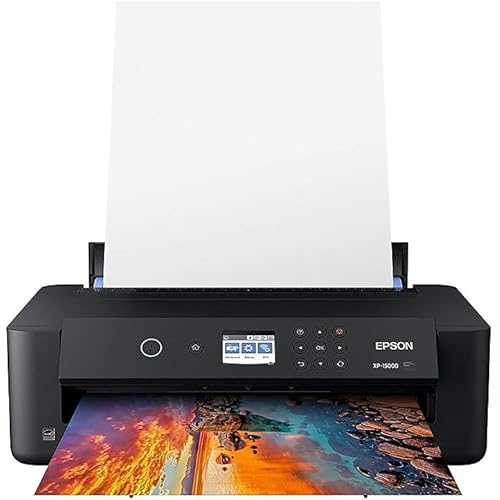
Epson EcoTank Photo ET-8550 Wireless Wide-format Color All-in-One Supertank Printer with Scanner Copier, Ethernet and 4.3-inch Colorfull Touchscreen

  • Based on 2,022 reviews
Condition: New
Product info up-to-date
$598.00 Why this price?
Save $221.99 was $819.99

Buy Now, Pay Later


As low as / mo
  • – Up to 36-month term if approved
  • – No impact on credit to apply
  • – Instant approval decision
  • – Secure and straightforward checkout

Ready to go? Add this product to your cart and select a plan during checkout.

Payment plans are offered through our trusted finance partners Klarna, Affirm, Afterpay, Apple Pay, and PayTomorrow. No-credit-needed leasing options through Acima may also be available at checkout.

Learn more about financing & leasing here.

Free shipping on this product

30-day refund/replacement

To qualify for a full refund, items must be returned in their original, unused condition. If an item is returned in a used, damaged, or materially different state, you may be granted a partial refund.

To initiate a return, please visit our Returns Center.

View our full returns policy here.


Availability: In Stock.
Fulfilled by NextGen Tech (SN Recorded)

Arrives Thursday, Mar 26
Order within 7 hours and 8 minutes
Available payment plans shown during checkout

Protection Plan Protect Your Purchase
Checking for protection plans...

Features

  • Cartridge-free printing for lab-quality photos, graphics and creative projects get vibrant colors and sharp text with Epson's high-accuracy printhead and Claria ET Premium 6-color inks; print a 4 x 6" photo in as fast as 15 seconds (4)
  • Extraordinary media support, including borderless photos up to 13" x 19" accommodates cardstock, CD/DVDs and other specialty media up to 1.3 mm thick; auto 2-sided printing
  • Amazing value save a ridiculous amount on photos (1) and creative projects with affordable in-house photo printing; print 4" x 6" photos for about 4 cents each vs. 40 cents with traditional ink cartridges (1)
  • Save up to 80% with low-cost replacement ink bottles vs. ink cartridges (3) that's about $2000 on each set (3), enough ink to print up to 6,200 pages color (5)
  • Print up to 2 years (2) with each included and replacement ink bottle set
  • Zero cartridge waste with high-yield ink bottles; each replacement ink bottle set is equivalent to about 100 individual ink cartridges (6)
  • Print, scan and more from your mobile device (7) with Epson Smart Panel app (8) set up, monitor and operate your printer directly from your mobile device; supports iOS and Android
  • Intuitive touch display and wireless connectivity 4.3" color display, voice-activated printing (9) and more for fast, easy performance
  • Exclusive EcoFit ink bottle design uniquely keyed for easy filling of each color
  • Use Genuine Epson Ink for optimal print quality and performance. Non-genuine ink could cause damage not covered by the printers limited warranty

Description

The EcoTank Photo ET-8550 wireless all-in-one prints lab-quality, wide-format color photos, graphics and everyday documents — all at an incredible value. Epson’s cartridge-free, 6-color Claria ET Premium Ink system delivers vibrant colors and sharp text for all your creative projects. With low-cost replacement ink bottles, print 4" x 6" photos for about 4 cents each compared to 40 cents with cartridges (1). Print everything from borderless 13" x 19" photos to customized CDs/DVDs. You can even print on cardstock and other media up to 1.3 mm thick. For added convenience, each set of bottles lets you print for up to 2 years (2). Plus, save up to 80 percent with replacement ink bottles vs. ink cartridges (3) — that’s about $2,000 on each set (3). The EcoTank Photo lets you do it all with affordable in-house printing. Epson strongly recommends the use of genuine ink to ensure optimal print quality and performance. Use of non-genuine ink could cause damage not covered under the printer’s limited warranty. | 1. Actual savings and costs will vary considerably based on print tasks, print volumes and usage conditions. Savings and cost per ISO 29103 page are based on the cost of replacement ink bottles and the cost of enough standard cartridges to achieve the total page yields of the bottles using the MSRP (USD) and yields for Epson standard-capacity ink cartridges for similarly featured Epson consumer inkjet printers as of May 2023. | 2. Based on average monthly document print volumes of about 200 pages. | 3. Actual savings and costs will vary considerably based on print tasks, print volumes and usage conditions. Savings and cost per ISO 24712 page are based on the cost of replacement ink bottles and the cost of enough standard cartridges to achieve the total page yields of the bottles using the MSRP (USD) and yields for Epson standard-capacity ink cartridges for similarly featured Epson consumer inkjet printers as of May 2023. | 4. Color photo in Draft Mode on Premium Photo Paper Glossy measured from start of paper feed. Actual print times will vary based on factors including system configuration, software, and page complexity. For more information, visit | 5. Replacement ink bottle yields based on the ISO/IEC 24712 pattern with Epson’s methodology. Replacement ink bottle photo yields are significantly lower and are based on the ISO/IEC 29103 pattern with Epson’s methodology. Actual ink yields will vary considerably for reasons including images printed, print settings, temperature and humidity. Yields may be lower when printing infrequently or predominantly with one ink color. All ink colors are used for printing and printer maintenance, and all colors must be available for printing. For more information, visit | 6. Individual cartridges estimate based on print yields of a replacement set of black and color ink bottles as compared to Epson standard-capacity ink cartridges for similarly featured Epson consumer inkjet printers as of May 2023. | 7. Most features require an Internet connection to the printer, as well as an Internet- and/or email-enabled device. For a list of Epson Connect enabled printers and compatible devices and apps, visit | 8. Epson Smart Panel app download required. Data usage fees may apply. | 9. Epson Connect account and voice-activated account registration required. See for device compatibility.

Specs & Other Info

Specification Details
Manufacturer Epson
Product Model EcoTank Photo ET-8550
Connectivity Wireless, USB
Printing Method Inkjet Technology
Key Features Auto Document Feeder, Double-Sided Scanning & Printing, Touch Screen Interface, Borderless Printing
Color Range Full Color
Maximum Color Print Speed 12 pages per minute
Maximum Monochrome Print Speed 16 pages per minute
Control Supported Mobile Devices (iOS, Android), PC
Maximum Print Size Up to 13" x 19" inch
Included Items EcoTank Photo ET-8550 printer, Setup Instructions, Power Cable, User Guide & Software CD, 6 bottles of 552 ink (70ml each)
Printing Quality Premium Quality (5760 x 1440 DPI Resolution)
Additional Functionality Scanning, Copying
Compatible Systems Wide range of OS including Windows and MacOS versions
Product Dimensions 29.8"D x 20.6"W x 16.9"H
Product Weight 31.9 Pounds
Product Release Date December 21, 2020
Origin Manufactured in Indonesia

Frequently asked questions

The Epson EcoTank ET-8550 is a Wireless All-in-One Supertank Printer capable of wide-format printing. It incorporates multiple functions such as printing, scanning, and copying and has a built in Ethernet port for network printing. It also comes with a 4.3-inch color touchscreen for easy navigation and operation. Additionally, the printer is styled in a large, white design.

Supertank in ET-8550 signifies that the printer uses Epson's EcoTank system which replaces traditional ink cartridges with high-capacity ink tanks. This allows you to print a larger number of pages before needing to refill the ink, making it a cost-effective choice for heavy printer users.

The ET-8550 All-in-One Supertank Printer can accommodate a wide range of paper sizes including wide-format sizes, giving you the flexibility to print everything from photos to posters.

Yes, the ET-8550 printer comes with built-in wireless capabilities, allowing you to print directly from your computer, tablet, or smartphone without needing to connect with a cable.

Top Amazon Reviews

Read our review

Is the Epson EcoTank Photo ET-8550 the Best Printer for Photographers in 2023?

🚀 Abunda's Overview

This is our summary and key points to consider based on customer reviews.


The Epson ET-8550 printer received mostly positive reviews, with customers praising its quality scanning features, great photo printing quality, and convenient multi-size paper trays. However, intermittent errors and usability issues mildly frustrated users. The printer garnered ample praise from photographers with its true-to-source color replication and efficiency via its ink tank system. Additionally, its automatic tray output and bright, intuitive screen struck a chord with the users.

Pros

  • 🖨️ High-quality photo printing and scanning, including color restoration features
  • 🌈 Accurate color replication for photo printing
  • 📦 Multi-size internal paper trays for ease of use
  • 🎛️ Bright, intuitive control screen
  • 💰 Efficient ink tank system that promises long-term savings
  • 🎈Automatically extends output tray and exceptional auto wake-up

Cons

  • 🚫 Occasional software errors requiring resets
  • 🖇️ Slightly tricky setup process, particularly around tray labeling and cassette placement
  • 📐 Sometimes makes undesired small crops to scanned photos
  • 💸 Higher price tag compared to similar printers in the market

Should I Buy It?

Definitely, this printer is a great investment for those who prioritize high-quality photo printing, convenience, and efficiency. Despite its higher price tag, the abundance of features seemingly justifies the cost, making it a worthwhile addition for both amateur and seasoned photographers alike. Its minor hardware and software glitches are outweighed by the over-all capabilities, versatility and convenience it offers.


  • Epson finally did inkjet printing right
Congratulations Epson I don't hate you anymore. I have had Epson inkjet printers for about 30 years. For my work as an artist I usually buy this size wide carriage 13x19. However I have never ever advised that anyone else I know buy a color inkjet printer unless they absolutely need one. I have two black and white laser printers that I adore because they just work, lightning fast, the toner is cheap, the print quality is excellent. My parents for instance have against my advice had a couple of color inkjets because they very occasionally want to print in color. Misery. The ink cartridges are always empty the heads are always clogged and the thing just refuses to print in black and white even though the black cartridge is full but one of the color cartridges is empty. My old Epson r2880 has eight tiny little cartridges and one or two of them are ALWAYS low or empty and they are crazy expensive. The cartridges are also chipped so that you can't use anyone else's aftermarket cartridges, and there's a whole industry dedicated to getting around these issues. In my opinion it's a terrible business model for a printer company because you make your customers hate you, go to great lengths to buy cheaper ink from other companies, and it all discourages them from using the printer and doing a lot of printing and buying your other supplies like paper. Well I read an awful lot about these new tank style printers and how they could potentially solve most of these issues. And I have to say I think they have nailed it. This printer is an absolute joy to use and you just look for excuses to print anything. The gloss prints on Epson ultra premium paper are simply the finest gloss prints I've ever seen. The ink tanks are huge and transparent so you can tell how much ink is in them and the ink lasts a way long time and it's really not that expensive. The ink bottles are actually kind of brilliant you can't put the wrong ink in the wrong tank cuz the nozzles are different shapes and they don't drip ink at all or anything. You can top them up at any time it's beautiful. Turns out you really don't need 8 or 10 colors to print gorgeous luminous prints. I am happy to buy Epson brand ink under these conditions. I mean I could still buy a different company's ink and put it in these tanks but why would you?I've always liked Epson photo paper and use it almost exclusively. I actually tell my kids to go and use the printer all they want. My neighbors too. If there's a print you think you might like print it for goodness sake! Print it larger! Now see Epson: THAT is a business model. I had trepidations as this is a die ink printer. Everyone says artists should "use pigment inks for archival longevity". I've decided I just don't care. Pigment inks tend to clog. They actually don't look that good on glossy paper did anyone ever tell you that? They need a special varnish coat in order for the gloss to pop. If one of these dye prints fades in 20 years you know what it's digital files, I'll just go print the darn thing again it's not that expensive on a printer like this. I even kind of like the Epson print layout software, even though it looks like it was designed in the Windows XP era, and the scanner and it's software work quite well. I've had Epson flatbed scanners also for years and this one being built directly into the printer is just very useful. The touch screen also works well and you can quickly run off a copy which I've never really been able to do before, because I've had a separate printer and scanner and it's just too much of a pain to fire them both up and get on the computer. Also the wireless print function is really great. I can print a 4x6 from my phone in a few clicks, or a PDF from my tablet, what have you. There's even a special paper slot just to hold 4x6s in addition to other paper, gloss full sheets in the rear feed, plain paper in the bottom tray. They really have kind of thought of everything with this printer. If I need to do some serious black and white printing of text I will still use the laser. On cheap copy paper the inkjet looks a little fuzzy and is actually not waterproof. But if I didn't have a laser I wouldn't go out and buy one because one printer is better than two. Just use inkjet plain paper and you'll be set This is a printer I can happily recommend to basically anyone, and I have never been able to say that about a color ink jet before. ... show more
Reviewed in the United States on March 22, 2024 by Count Orloff

  • Great quality prints, surprisingly fast and cost-effective.
I ordered this to print a large batch of wedding photos in a variety of sizes, though I had been eyeing it for years for printing my other photos like landscapes. The printer was easy enough to set up and calibrate (although since it has a scanner, Epson could automate the alignment). I threw in some third party paper, selected a color profile, and was up and printing with good color and brightness in two or three prints. I have been printing 13x19's at a rapid pace, and the ink levels have barely gone down. Most of the cost of my prints seems to be the paper, by a wide margin. The print quality appears to be excellent, and an 11x17 with an inch margin only takes about five minutes to print! I have been avoiding borderless prints so far, as I have read that the ink can get on the rollers, and I can batch up smaller sizes onto a full sheet, then cut with a paper cutter. The maintenance tank shows slightly reduced capacity, so I'll be keeping one of those on hand along with extra ink. Wireless connection on Windows was very simple - the utility found the printer, so it was a one click operation. I have noticed that if my network is congested, prints can take a little longer, but I'm sending the full resolution image to the printer (rather than setting dpi and scaling before transmission), so some buffering delay is to be expected. I see that noise level is a recommended topic, and the printer really is quiet while printing, though there are some clunks at startup. Most of the time it's quieter than my laser printer. ... show more
Reviewed in the United States on December 4, 2025 by rwags

  • First Bad Review I've Ever Left...On Anything
I make a point to never leave bad reviews. I don't like the idea of putting negativity out in the world. BUT MY GOD I HATE THIS PRINTER. Before purchasing I read (and still see) so many great reviews, so I'm willing to concede that maybe I just got a total lemon. But if I hadn’t spent $800 on this printer, I would've chucked it on week one. Printers can be fussy, but I've never experienced so many different issues that I can't even pinpoint a potential problem. I'm going to allow myself one glorious meltdown venting session. Bc this printer is worth it. The manual feed on the back works about 1/10 attempts. At best. Error after error message even though everything was completed 100% to spec. I've stopped using the manual feed completely, and have conceded that even though I purchased this printer SPECIFICALLY for the ability to print on cardstock and other thick paper stocks, this is simply not a feature I get to use. Ever. I am not a stupid woman, nor am I technologically challenged. * This is not user error. * When I use the top paper feed, anything above basic print quality produces lines. When I try to realign the print heads to fix this, it will only select from one particular print cartridge for this, and the paper folds and crumbles in the interior (even though all the back manual feed equipment is properly reinstalled) and has to be carefully pried out by hand, so bc it only accepts paper for print head alignment, etc, through THIS ONE paper feed, I have not been able to realign the print heads. I get decent enough prints from the basic print setting, but I'm prevented from printing higher quality. As a professional artist, this is not okay. As I sit here venting on Amazon for the first time ever, the printer sits beside me, refusing to accept print commands from my computer wirelessly even though it says it's connected. So I transferred my 12x18" image to an SD card to print directly from the unit, but for some reason, the printer tells me that 12x18" is not a valid paper size and refuses to print, even though it has (in the past) via wireless connection. My only other option was to connect the printer directly to the computer (with a wire that is NOT included with purchase). Right now, it's pretending to print. It's a liar. I hear a single print line being created once every 30-45 seconds. It's been doing this for about 15 minutes, and I'm guessing I have about half an inch of my image completed in that 15 minutes. Have I mentioned the weird chugging sound it makes...all the time? This MUST be an anomaly. Maybe everyone else received a perfect printer and I got a factory reject that slipped through inspection. I am a professional artist and photographer, and rely on the sale of prints to help support my work. I have an event this weekend and at this point I am quite screwed. Could I go back in time, I'd purchase anything else. I hate this printer more than I hate any other item in my studio/office...and I sit next to a litter box. ... show more
Reviewed in the United States on October 18, 2022 by Shan Leah

Can't find a product?

Find it on Amazon first, then paste the link below.