




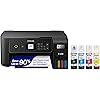
Epson EcoTank ET-2800 Wireless Color All-in-One Cartridge-Free Supertank with Scan and Copy, The Ideal Basic Home Printer - Black




Buy Now, Pay Later
- – 6-month term
- – No impact on credit to apply
- – Instant approval decision
- – Secure and straightforward checkout
Ready to go? Add this product to your cart and select a plan during checkout.
Payment plans are offered through our trusted finance partners Klarna, Affirm, Afterpay, Apple Pay, and PayTomorrow. No-credit-needed leasing options through Acima may also be available at checkout.
Learn more about financing & leasing here.
Selected Option
FREE 30-day refund/replacement
To qualify for a full refund, items must be returned in their original, unused condition. If an item is returned in a used, damaged, or materially different state, you may be granted a partial refund.
To initiate a return, please visit our Returns Center.
View our full returns policy here.
Recently Viewed

Color: Black
Style: ET-2800-B
Pattern Name: Printer
Features
- Keep your office running smoothly with the Epson EcoTank ET-2800 All-in-One Supertank Color Printer. Expect vivid, detailed prints and documents thanks to Micro Piezo Heat-Free Technology. Quickly fire off up to 10 pages per minute to accomplish large jobs with ease.
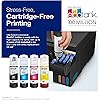
- Innovative Cartridge-Free Printing . No more tiny, expensive ink cartridges; each ink bottle set is equivalent to about 80 individual cartridges (2)
- Dramatic Savings on Replacement Ink , Save up to 90% with replacement ink bottles vs. ink cartridges (1) - thats enough to print up to 4,500 pages black/7,500 color (3)
- Stress-Free Printing - Up to 2 years of ink in the box - and with every replacement ink set - for fewer out of ink frustrations
- Zero Cartridge Waste - By using an EcoTank printer, you can help reduce the amount of cartridge waste ending up in landfills
Description
Your family needs a printer that’s fast, affordable, and easy to use. That’s why we developed the EcoTank ET-2800 – an innovative cartridge-free solution that uses high-capacity, easily refillable ink tanks. So you’ll worry less about running out of ink, and save a lot on replacement ink (1). The ET-2800 features genuine Epson print quality, a high-resolution flatbed scanner, and convenient color display – making it the ideal basic home printer. Epson strongly recommends the use of genuine ink to ensure optimal print quality and performance. Use of non-genuine ink could cause damage not covered under the printer’s ltd. wnty. | 1. Actual savings and costs will vary considerably based on print tasks, print volumes and usage conditions. Savings and cost per ISO page are based on the cost of replacement ink bottles and the cost of enough standard cartridges to achieve the total page yields of the bottles using the MSRP (USD) and yields for Epson standard-capacity ink cartridges for similarly featured Epson consumer inkjet printers as of March 2024. | 2. Individual cartridges estimate based on print yields of an included or replacement set of black and color ink bottles as compared to Epson standard- capacity ink cartridges for similarly featured printers as of March 2024. | 3. Part of the ink from the included bottles is used for initial setup; yields are lower than those of replacement ink bottles. Replacement and included ink bottle yields based on the ISO/IEC 24712 pattern with Epson’s methodology. Actual ink yields will vary considerably for reasons including images printed, print settings, temperature and humidity. Yields may be lower when printing infrequently or predominantly with one ink color. All ink colors are used for printing and printer maintenance, and all colors must be available for printing. For more information, visit | 4. Based on average monthly document print volumes of about 125 pages. | 5. See for device compatibility. Epson Connect™ account and voice-activated account registration required. | 6. Most features require an Internet connection to the printer, as well as an Internet- and/or email- enabled device. For a list of Epson Connect enabled printers and compatible devices and apps, visit | 7. Requires Epson Smart Panel app download. Data usage fees may apply.
Brand: Epson
Connectivity Technology: USB, Wi-Fi
Printing Technology: Inkjet
Special Feature: Mobile Printing Capability, Refillable Ink Tank
Color: Black
Model Name: ET-2800 Black
Printer Output: Color
Maximum Print Speed (Color): 5 ppm
Max Printspeed Monochrome: 10
Item Weight: 8.8 Pounds
Printer Type: Inkjet
Other Special Features of the Product: Mobile Printing Capability, Refillable Ink Tank
Printer Output Type: Color
Item Weight: 8.8 Pounds
Item Dimensions D x W x H: 14.8"D x 22.8"W x 10"H
Controller Type: Android
Print media: Envelopes, Glossy photo paper, Paper (plain)
Scanner Type: Flatbed
Maximum Copy Speed Black and White: 10 ppm
Display Type: LCD
Warranty Type: limited warranty
EU Spare Part Availability Duration: 1 Years
Ink Color: Black, Cyan, Magenta, Yellow
Resolution: 5760 x 1440
Additional Printer Functions: All In One
Control Method: App
Number of Trays: 1
Maximum Media Size: 8.5 x 14 inch
Maximum Sheet Capacity: 100
Paper Size: 4x6 inches,5x7 inches
Output sheet capacity: 100
Maximum print Resolution Color: 5760 x 1440 dpi
Maximum Print Resolution Black and White: 5760 dpi
Power Consumption: 12 Watts
Wattage: 12 watts
Maximum Copy Resolution Color: 720 x 720 dpi
Maximum Copy Resolution Black and White: 300 x 600 dpi
Brand: Epson
Model Name: ET-2800 Black
Model Number: ET-2800 Black
Built-In Media: Ink Bottles, Manuals, Power cord, Software
Series Number: 2800
Model Series: EcoTank
Specific Uses For Product: Home
UPC: 010343957886
Item Type Name: Inkjet Printer
Manufacturer: Epson
Unit Count: 1.0 Count
Warranty Description: 1-year limited warranty
Color Pages per Minute: 5 ppm
B&W Pages per Minute: 10
Color: Black
Color Depth: 24 bits_per_pixel
Printer Connectivity Type: USB, Wi-Fi
Hardware Interface: Ethernet
Total USB 2.0 Ports: 1
Total Usb Ports: 1
Dual-sided printing: No
Duplex: Simplex
Frequently asked questions
To initiate a return, please visit our Returns Center.
View our full returns policy here.
- Klarna Financing
- Affirm Pay in 4
- Affirm Financing
- Afterpay Financing
- PayTomorrow Financing
- Financing through Apple Pay
Learn more about financing & leasing here.
Similar Products




Top Amazon Reviews
🚀 Abunda's Overview
This is our summary and key points to consider based on customer reviews.
The Epson EcoTank ET-2800 printer garners mixed reviews, but positive feedback tends to highlight its superior ability to handle heavy card stock, robust ink storage system, quality print output, and wireless functionality. Detractors often spotlight its complex setup process, relatively low printing speed, bulky size, and power consumption.
Pros
- 🖨️ Handles heavyweight card stock with ease
- 🎨 Provides a cost-effective ink solution with long-lasting in-built tanks
- 🌐 Includes wireless functionality, enabling easy device synchronization
- 🚀 Delivers quality text and color prints suitable for home use
Cons
- ⛔ Users report the setup process can be convoluted and frustrating
- 🐌 The printing speed may be insufficient for those needing to print large documents frequently
- 🔍 Takes up a considerable amount of desk space due to its bulkiness
- 💡 More power consuming than some users would like
Should I Buy It?
If you're looking for a printer for basic home use focusing on quality and cost-effectiveness, specifically for printing on heavier card stock, the Epson EcoTank ET-2800 is a solid choice. Nonetheless, if you value speed, a quiet operation, and modern aesthetics or have limited space, exploring other options might be beneficial.