Search  for anything...

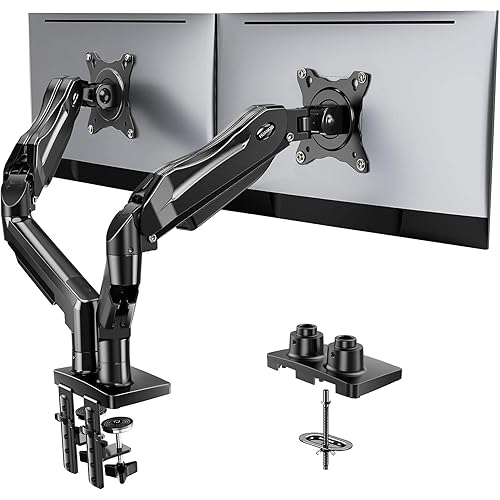
VIVO Dual Monitor Stand, Fully Adjustable Arms for 17 to 32 inch Screens, Mechanical Articulating Desk Mount, Gaming and Office Setups, VESA 75x75, 100x100, Max 19.8 lbs, Classic, Black, STAND-V002O

  • Based on 4,745 reviews
Condition: New
Checking for the best price...
$49.99 Why this price?
Save $10.00 was $59.99

Buy Now, Pay Later


As low as $8.33 / mo
  • – 6-month term
  • – No impact on credit to apply
  • – Instant approval decision
  • – Secure and straightforward checkout

Ready to go? Add this product to your cart and select a plan during checkout.

Payment plans are offered through our trusted finance partners Klarna, Affirm, Afterpay, Apple Pay, and PayTomorrow. No-credit-needed leasing options through Acima may also be available at checkout.

Learn more about financing & leasing here.

Selected Option

Free shipping on this product

FREE 30-day refund/replacement

To qualify for a full refund, items must be returned in their original, unused condition. If an item is returned in a used, damaged, or materially different state, you may be granted a partial refund.

To initiate a return, please visit our Returns Center.

View our full returns policy here.


Availability: In Stock.
Fulfilled by Amazon

Arrives Friday, Mar 27
Order within 20 hours and 48 minutes
Available payment plans shown during checkout

Protection Plan Protect Your Purchase
Checking for protection plans...

Size: Dual Mount


Color: Black


Features

  • Screen Compatibility: Universally compatible with most 17-inch to 32-inch flat and curved screens weighing from 4.4 lbs to 19.8 lbs each with VESA 75x75mm or 100x100mm mounting patterns
  • Mechanical Spring Adjustment: Toolless monitor placement with perfect counterbalance presentation in all directions. Please Note: The back of the arms will extend past the edge of your desk
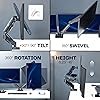
  • Articulation, Swivel, & Tilt: The mounting brackets offer +90 to -90 tilt, 180 swivel, and 360 rotation for convenient, customizable viewing angles
  • Easy Assembly: All hardware and step-by-step instructions are provided for smooth assembly. The open-top VESA plates create easy slide-on monitor installation
  • Clear Up Desk Space: Reclaim valuable desk space by elevating 2 screens and mounting this stand to your surface of choice with the heavy-duty C-clamp (tops up to 3.1") or optional bolt-through grommet mount (tops up to 1.9")

Mounting Type: Tabletop Mount


Movement Type: Articulating


Brand: VIVO


Material: Alloy Steel


Color: Black


Compatible Devices: Monitor


Maximum Tilt Angle: 90 Degrees


Global Trade Identification Number: 51


UPC:


Manufacturer: VIVO


Package Dimensions: 15.07 x 6.97 x 4.8 inches


Item Weight: 9.04 pounds


Item model number: STAND-V002O


Is Discontinued By Manufacturer: No


Date First Available: December 28, 2016


Manufacturer: VIVO


Frequently asked questions

If you place your order now, the estimated arrival date for this product is: Friday, Mar 27

Yes, absolutely! You may return this product for a full refund within 30 days of receiving it.

To initiate a return, please visit our Returns Center.

View our full returns policy here.

  • Klarna Financing
  • Affirm Pay in 4
  • Affirm Financing
  • Afterpay Financing
  • PayTomorrow Financing
  • Financing through Apple Pay
Leasing options through Acima may also be available during checkout.

Learn more about financing & leasing here.
Top Amazon Reviews


  • Pretty good overall, would buy again
Size: Dual Mount Color: Black
works if you want your monitors in one position only or viewing angle. Not as much range of motion as you would like. very easy to install. very sturdy, monitors will not move or fall. perfect size for my medium sized desk
Reviewed in the United States on January 29, 2026 by Axel

  • Great starter OLED monitor
Size: Single Mount Color: Black
Amazing monitor for the value purchased, and was very easy to setup. A huge step-up from my IPS monitor and the arm holds the monitor well. It has good height adjustment features because of the arm and fits my desk very well. The 27" proportions are great as well for the price
Reviewed in the United States on March 5, 2026 by Timothy

  • Great dual monitor stand
Size: Dual Mount Color: Black
These are fairly easy to put together and are very sturdy. I also like that they come with wire management and a way to run and hide your wires. It attached to the desk and is doing a great job keeping my monitors where I want them. Easily moveable and you can position your monitors however you please. Great addition to my at home office. ... show more
Reviewed in the United States on March 1, 2026 by Russell England

  • Quality monitor arm at a good price
Size: Dual Mount Color: Black
Got this stand to replace the single monitor stand that I had. It’s easy to assemble. Comes with a little screw driver and tool to put everything together. The instructions are easy to follow as well. It’s not difficult to move the arms around, and it stays in place. You can connect it to your desk in a few different ways as well. The only thing that I didn’t realize, which is my fault, is that the arms don’t go up as high as I would like them to for the monitors to sit above my laptop screen. Probably another inch and a half up would be good. With that being said, for the price, it doesn’t bother me. ... show more
Reviewed in the United States on February 12, 2026 by Amazon Customer

  • Outstanding quality for the price, Just make sure you have room between desk and wall
Size: Dual Mount Color: White
This is an amazing monitor arm for the cost. I checked a lot of longevity and quality focused online forums for recommendations on monitor arms that didn't suck, and I'll say that these don't disappoint, at least so far. They don't sag or otherwise move in a way you don't want them to after you've positioned them, they weren't terribly hard to assemble either, and they've got a great range of movement in all directions, whether you need them to just be higher up, or way further back from your face. The base takes up about 2 inches of space forward into the desk, and doesn't feel obtrusive. It's holding my relatively heavy monitors, with extra weighty cables, and can take a bit of downward or upward pressure from my hand on top before it begins to move, so it's definitely very sturdy. One thing you MUST be aware of though, is that if you have your desk close to the wall, this will have to push your monitors closer to you, since the arms extend backwards if you push the monitors away from you. Think of a "W" shape, where the two points at the bottom of the W are the back of the arms. Pushing the monitors further away makes it more of a point, and pushes that point further back, meaning it could bump into your wall if your desk is too close. Give your wall and your desk some room where possible. ... show more
Reviewed in the United States on July 21, 2025 by Alex

  • Great for the Price, Clamp placement very important,
Size: Single Mount Color: Black
In my initial setup, I sought to optimize my desktop space by utilizing an arm for my 30-inch 4K Asus display. This display, weighing 18 pounds, is manageable for the arm to hold it without any issues. When considering the arm’s placement, it is crucial to evaluate the proximity of your arm to the wall. If there is sufficient space on your desk to position the clamp centrally, this configuration offers the most comprehensive functionality. Conversely, if your desk is adjacent to the wall, you will require additional space to accommodate the clamp on your desk. In such cases, the clamp will need to be positioned to the left or right of the center, rendering certain features ineffective. 1. Potential challenges include cable routing and display movement. Cable routing necessitates ensuring that cables have adequate reach. Additionally, as you move the display towards you, the arm may not maintain its level, necessitating adjustments at each step. If the arm is positioned to the right of the center, it will begin to tilt to the right, and the same issue occurs on the left side. The arm’s design presents certain inconveniences. Tightening the arms to secure the display can hinder adjustments, as loosening them results in sagging. Furthermore, if the arm is only positioned vertically, it will maintain its level but begin to move to the right. Moving it back to the center requires repositioning it downward. The same principle applies when moving the arm downward, causing it to tilt to the left. To mitigate these issues, it is advisable to adjust the arm to its most frequently used position. In my setup, I installed speakers on both sides and centered mine at the appropriate height. Lastly, cable management is a critical aspect to consider. The arm itself was relatively straightforward to assemble, but concealing the cables proved to be the most challenging task. It is essential to plan the routing of cables through the arms. I utilized a power cable, two HDMI cables, and cables originating from both the right and left sides. Due to the arm’s placement, I had to procure a longer power cable. ... show more
Reviewed in the United States on September 3, 2025 by Testeverything

  • EZ assembly and adjustment
Size: Single Mount Color: Black
High quality monitor arm that works well for my 24” TV (as a computer monitor) … easy assembly and adjustment of tension.
Reviewed in the United States on February 4, 2026 by JeffRey A. Rinker

  • Dual Monitor Stand Installed, Good Stand for the Price
Size: Dual Mount Color: Black
This is a good dual monitor stand for the price. While I was assembling the monitor stand with the two monitors, I found it easy to adjust the tension on the screws to put the monitor where I wanted them. The two monitors are off the desk, providing me more desk space, and at the level of my eyes where I am not bending my neck down. This should help me avoid neck pain problems or stiffness. Adjusting these monitors after installation is easy, the motion range for more custom adjustments is good. The monitor stand seems sturdy and stable where the monitors are not moving from vibrations. My rating would be 4.5 out of 5.0. There were a few screws missing from the package and the Large Pad missing. I found something to substitute the missing large pad to avoid scratching my desk. ... show more
Reviewed in the United States on September 9, 2025 by Nipdawg

Can't find a product?

Find it on Amazon first, then paste the link below.
Checking for best price...