

Search  for anything...

PlayStation Portal Remote Player 5

  • Based on 4,981 reviews
Condition: New
Checking for the best price...
$199.00 Why this price?
Save $6.49 was $205.49

Buy Now, Pay Later


As low as $33.17 / mo
  • – 6-month term
  • – No impact on credit to apply
  • – Instant approval decision
  • – Secure and straightforward checkout

Ready to go? Add this product to your cart and select a plan during checkout.

Payment plans are offered through our trusted finance partners Klarna, Affirm, Afterpay, Apple Pay, and PayTomorrow. No-credit-needed leasing options through Acima may also be available at checkout.

Learn more about financing & leasing here.

Selected Option

Free shipping on this product

FREE 30-day refund/replacement

To qualify for a full refund, items must be returned in their original, unused condition. If an item is returned in a used, damaged, or materially different state, you may be granted a partial refund.

To initiate a return, please visit our Returns Center.

View our full returns policy here.


Availability: In Stock.
Fulfilled by Amazon

Arrives Mar 27 – Mar 28
Order within 16 hours and 21 minutes
Available payment plans shown during checkout

Protection Plan Protect Your Purchase
Checking for protection plans...

Color: White


Features

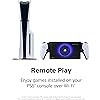
  • Play Your Game Collection with Remote Play - PlayStation Portal Remote Player can play compatible games you have installed on your PS5 console, including your favorite games for PS5 and PS4.*
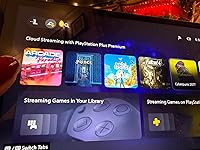
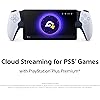
  • Cloud Streaming from the Game Catalog and Classics Catalog - Discover an awesome library of PS5 games on the PlayStation Portal Remote Player with PlayStation Plus Premium. Access hundreds of games from the Game Catalog and Classics Catalog, streamed directly to your PlayStation Portal Remote Player with new games added every month. Cloud Streaming from the Game Catalog and Classics Catalog - Discover an awesome library of PS5 games on the PlayStation Portal Remote Player with PlayStation Plus Premium. Access hundreds of games from the Game Catalog and Classics Catalog, streamed directly to your PlayStation Portal Remote Player with new games added every month.
  • Cloud Streaming for PS5 Games in Your Library - With PlayStation Plus Premium, stream select digital PS5 games in Your Library from PlayStation Store directly to your PlayStation Portal Remote Player, with no downloads required. Enjoy instant access to some of the latest and greatest PS5 games in the palm of your hand.
  • Tempest 3D AudioTech - Surround yourself with sound via Tempest 3D AudioTech on PlayStation Portal Remote Player. Experience realistic, immersive audio in supported PS5 games when a compatible audio device is connected, either wirelessly via PlayStation Link or wired via the 3.5mm audio jack.
  • Beautiful 8 LCD Screen - Take in every exquisite detail of your favorite games as they come alive on a brightly lit and gorgeous full HD screen.
  • 60fps Capable at 1080p Resolution - PlayStation Portal Remote Player can deliver silky smooth gameplay at up to 60fps with high image clarity on its 1080p resolution screen.***
  • *PlayStation Portal Remote Player can stream compatible games installed on your PS5 console. PlayStation Portal Remote Player requires broadband internet Wi-Fi with at least 5Mbps for use. For a better play experience, a high-speed connection of at least 15Mbps is recommended. The quality and connectivity of your play experience may vary depending on your network environment. A PS5 console and account for PlayStation Network is required. The PS5 console must be connected to a broadband internet connection, powered on fully or in Rest Mode, and it must be paired with your PlayStation Portal Remote Player to play installed games
  • ** Games that require a VR headset (PlayStation VR or PlayStation VR2) or additional peripherals (other than a DUALSHOCK 4, DualSense, or DualSense Edge wireless controller) are not compatible. Games that must be streamed on PS5 using a PS Plus Premium membership are not compatible. Haptic feedback and adaptive trigger features
  • *** Individual game performance will vary based on the specific game being played, and the quality of connectivity in your network environment. Haptic feedback and adaptive trigger features are only available when those features are supported by the game being played.

Description

Feel the Power of PlayStation® in the Palm of Your Hand. Play your PS5 console over Wi-Fi with console quality controls using PlayStation Portal Remote Player. Experience the incredible immersion of DualSense wireless controller features like haptic feedback and adaptive triggers in supported games. Put your game collection on PS5 in the palm of your hand— PlayStation Portal Remote Player can play compatible games you have installed on your console without needing to play on a TV.

Platform: PlayStation 5


Input Device: Joystick


Connectivity Technology: Wi-Fi


Memory Storage Capacity: 2 GB


Wireless Communication Technology: Wi-Fi


Resolution: 1080p


Color: White


Brand Name: PlayStation


Model Name: PlayStation Portal Remote Player


Model Number: 1000041319


Manufacturer: Sony Interactive Entertainment


UPC: 711719579779


Global Trade Identification Number: 79


Item Weight: 540 Grams


Warranty Description: 1 year manufacturer


Frequently asked questions

If you place your order now, the estimated arrival date for this product is: Mar 27 – Mar 28

Yes, absolutely! You may return this product for a full refund within 30 days of receiving it.

To initiate a return, please visit our Returns Center.

View our full returns policy here.

  • Klarna Financing
  • Affirm Pay in 4
  • Affirm Financing
  • Afterpay Financing
  • PayTomorrow Financing
  • Financing through Apple Pay
Leasing options through Acima may also be available during checkout.

Learn more about financing & leasing here.

Top Amazon Reviews

🚀 Abunda's Overview

This is our summary and key points to consider based on customer reviews.


```

The PS Portal garners high praise for its ability to stream PS5 games with nearly identical graphical quality, providing a seamless gaming experience across home Wi-Fi networks and even over phone hotspots, though with some limitations. Many users appreciate the convenience of gaming in bed, on the couch, or on the go, highlighting the device's solid performance and beautiful display. However, concerns about lack of browser, Bluetooth audio, downloadable content, and issues with Wi-Fi connectivity and controller size for those with smaller hands have been noted.

Pros

  • 🎮 Seamless gaming on home Wi-Fi with near PS5-quality graphics
  • 📱 Playable over phone hotspot with decent performance
  • 🕹 Feels like playing PS5 on the go with great graphical fidelity
  • 👀 Beautiful screen that rivals TV quality for gaming
  • 🌐 Good functionality when Wi-Fi meets recommended speeds

Cons

  • 🌍 No built-in browser limits connectivity options
  • 🔊 Lacks Bluetooth audio support; wired headphones required
  • 💾 Cannot download playable media; streams PS5 games only
  • ☀️ Screen glare issue in direct sunlight
  • 📶 Some reported Wi-Fi connectivity issues, affecting multiplayer gaming

Should I Buy It?

If you're a PS5 enthusiast looking for the flexibility to play your games anywhere around the house or on the go, the PS Portal is definitely worth considering. Despite its shortcomings like the lack of Bluetooth audio and downloadable content, its impressive screen and seamless gameplay make it a strong contender for those wanting to extend their PlayStation experience beyond the living room. However, potential buyers should weigh the connectivity requirements and the occasional Wi-Fi hiccups before making a decision.

```

  • Fantastic device for what it is: a PS5 remote player with all the functionality of a PS5 controller
Color: White
The PS portal is a remote play device that connects to your PS5 allowing you to play games without use of the television. This is what it is advertised as doing, and it does this very well. There has been a recent update to the device that allows you to stream games from the PS Plus library of games if you are a PS Plus subscriber, completely bypassing your PS5. As of this review, the feature is still in beta, however, from my testing it works well. If you have a good connection from your PS5 to your router and have a good WiFi connection outside, you can even remote play your PS5 while you are not at home, such as in a hotel. I suggest using your phone's hot spot on a 5G connection to do this. For a more responsive and lag free experience make sure your PS5 is connected to your router with an Ethernet cable instead of connecting via WiFi. This will provide a stable experience on your PS Portal. Remember that this is not a stand alone console like a Switch or a Steam Deck allowing you to play games directly on the machine. The PS Portal connects to your PS5 or can stream games from the PS Plus library if you are a subscriber. The PS Portal itself has all the functions of the PS5 controller which is awesome. That means when you play a game that makes use of the adaptive triggers, the PS Portal will feel just like your PS5 controllers. For instance, pulling an arrow back on a bow in a game with the actually feels like there is bow string tension in the trigger. This is light years better than just getting a set of controllers that attaches to a phone for remote play. It also has all the buttons like the PS button, screen capture button, and options button. The only thing missing is the touch pad. In order to use the touch pad, you actually touch the screen on the PS Portal and a virtual touch pad pops up on the screen. My favorite feature is that the PS Portal allows you to wake up your PS5 from sleep mode. If someone in the house is using the TV, no problem. Just pick up your PS Portal, connect to your PS5, and starting playing your games! ... show more
Reviewed in the United States on July 22, 2025 by Y. T.

  • I love this thing, but not for everyone.
Color: White
I love the PS Portal. I didn't get it. I still don't. But I love it. Pros: - Can game anywhere in your home wifi network pretty well. Graphics look almost as good as the PS5. It has had a few drop outs while in the bathroom for some reason and it stutters. But generally only has happened a few times. - Works decently on phone hotspot. It's playable, granted it hiccups more than I'd like it too. And the graphics don't look as sharp as home network. - Feels like playing PS5 on the go, in bed, or lying on the couch. Almost the same graphical power and look- it doesn't look quite as good as tv but it's very close- especially coming from the antique switch. Cons: - No browser, so you have to use hotspot/wifi over connecting it directly while on restaurant/hotel wifi - No blu tooth audio, that's a big issue, but maybe due to latency? Wired headphones work great though. - No downloadable playable media. If it had this, this game system would be the king. - Hard to get (check out the app Hotstock. I found one in less than two days casually looking on the app). - Screen is quite reflective, so hard to play outside in the sun. - It sometimes drops wifi connection and it's laggy or slow during those moments, not great for multiplayer games where speed and accuracy is an asset. - It takes around 20-30 seconds to boot up. So if you're a grab and play for a few minute kind of person, huge disadvantage vs a switch, where I could pick it up and play immediately for 5-10 minutes. This is a bit more of a time commitment. - YOU HAVE TO keep your PS5 on rest mode or this won't function at all. If you have a home power outage while on a trip, you're carrying around a portal for nothing. Not only does it need to be on, but you need to be logged into your account on your machine. - My hands aren't quite as large so the controller is a little big in my hands compared to the smaller switch, so it's a little less comfortable, but doesn't bother me that much. - get a case, this thing is big and more delicate. The case makes it feel really solid. I got a clear case with a screen protector, it's nice. Reasons I got a Portal: I love handheld gaming - I've played my switch 90/10 to my ps5. My biggest drawback to using a switch or a steam deck, I like being able to play on the TV and on handheld- but the switch has huge graphical drawbacks, so I never hooked it up to the TV. It's really cool to have your games all be on one cohesive network of games and saves. The screen is really nice and looks about as nice as playing on my TV. Anyone that approaches this with an open-mind will love it. I'll probably keep my switch for trips and keep the portal at home for playing in bed or lying on the couch. I've enjoyed it- once they get a PS5 connected handheld that can download games and create a cloud saving- I'm completely in. ... show more
Reviewed in the United States on March 14, 2024 by Amazon Customer

  • Far better than I ever thought
Color: Midnight Black
I wasn’t sure if this was going to be as cool as I wanted it to be. But it’s a hundred times better. It could be a bit easier/smoother to switch between profiles, and to get the most out of it you really do need a premium plus account. Those are the downsides. But that premium account gives you access to a really quite good library of old and new games to stream, and you can stream certain games you already own. Streaming is the only way to play if someone else is using the PlayStation, otherwise you can play any game on the portal via the PlayStation. A decent WiFi connection is a must for streaming, and you are kicked off the server if youre inactive for too long. It’s really comfortable to use, the controllers are the same as normal just a little smaller. The screen is absolutely perfect - crystal clear and the exact right size. The screen is comparable in size to the size of the tv across the room, IYKWIM (see pic). I’ve found it to be a more pleasurable way of gaming. I can take it in with me while I make dinner, bring it to bed or to the bathroom (always looking for ways not to scroll on the toilet 😉), and I can curl up with it on the sofa with it. I’ve even tried it on the stationary bike with great success. The battery lasts a good long while, and you get warnings when it’s getting low and when it’s getting desperate. It’ll happily keep going if you plug it in though. I got an off brand charging stand for it, which I’d recommend because it’s fairly sizeable and I could see it being easily knocked off a surface or sat on. Excellent, I choose it over the main console almost every time. ... show more
Reviewed in the United States on January 7, 2026 by Victoria

Can't find a product?

Find it on Amazon first, then paste the link below.
Checking for best price...