Search  for anything...
HP

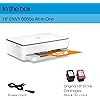
HP ENVY 6055e Wireless Color All-in-One Printer with 3 Months Free Ink with HP+ (223N1A) (Renewed)

  • Based on 684 reviews
Condition: Refurbished - Premium
Checking for the best price...
$71.98 Why this price?
Save $198.01 was $269.99

Buy Now, Pay Later


As low as $12.00 / mo
  • – 6-month term
  • – No impact on credit to apply
  • – Instant approval decision
  • – Secure and straightforward checkout

Ready to go? Add this product to your cart and select a plan during checkout.

Payment plans are offered through our trusted finance partners Klarna, Affirm, Afterpay, Apple Pay, and PayTomorrow. No-credit-needed leasing options through Acima may also be available at checkout.

Learn more about financing & leasing here.

Selected Option

Free shipping on this product

365-day refund / replacement

To qualify for a full refund, items must be returned in their original, unused condition. If an item is returned in a used, damaged, or materially different state, you may be granted a partial refund.

To initiate a return, please visit our Returns Center.

View our full returns policy here.


Availability: In Stock.
Fulfilled by Amazon

Arrives Sunday, Mar 29
Order within 16 hours and 57 minutes
Available payment plans shown during checkout

Protection Plan Protect Your Purchase
Checking for protection plans...

Style: Renewed


Features

  • FROM AMERICA'S MOST TRUSTED PRINTER BRAND Perfect for busy families printing documents, borderless photos, homework and creative projects. Print speeds up to 7 pages per minute color, 10 pages per minute black.
  • 3 MONTHS OF INK INCLUDED when you activate HP+ Includes 3-month subscription for Instant Ink delivery service with HP+ activation. Ink ships automatically so you never run out. After 3 months, monthly fee applies unless cancelled, and you save up to 50%.
  • INCLUDES HP+ SMART FEATURES Activate HP+ to get advanced features for mobile printing, security, automatic updates and more. HP+ only works with an HP account, internet connection and HP Ink for the life of the printer.
  • KEY FEATURES Print, copy, scan, auto 2-sided and borderless printing, mobile and wireless printing.
  • HP SMART APP Print, scan and copy from your phonefrom anywhere. Get additional advanced features with HP+.
  • EASY TO GET IT ALL DONE Easy wireless setup and self-healing Wi-Fi
  • This printer is intended to work only with cartridges with HP chips or circuitry and will block cartridges using non-HP chips or circuitry. Periodic firmware updates will maintain the effectiveness of these measures.

Description

The HP ENVY 6055e makes it easy to print, scan and copy creative projects, borderless photos and homework with automatic 2-sided printing. It includes the optional HP+ Smart Printing System that keeps itself up to date and ready to print from virtually anywhere at any time—at no additional cost.

Brand: HP


Connectivity Technology: USB, Wi-Fi


Printing Technology: Inkjet


Special Feature: Auto-Duplex, Cloud Print Enabled, Decal-Printing, Energy Star, Network-Ready


Color: white


Model Name: 6055e Renewed


Printer Output: Color


Maximum Print Speed (Color): 7 ppm


Max Printspeed Monochrome: 10 ppm


Item Weight: 12.95 Pounds


Product Dimensions: 5.44"D x 17.29"W x 14.89"H


Controller Type: Android


Maximum Media Size: 8.5 x 11 inch


Power Consumption: 16 Watts


Included Components: HP 67 Setup Black Cartridge, HP 67 Setup Tri-Color Cartridge, HP ENVY 6055e All-in-One Printer, Reference guide, Regulatory flyer, Setup guide


Print media: Envelopes, Glossy film, Glossy photo paper, Labels, Paper (plain)


Scanner Type: Flatbed


Max Input Sheet Capacity: 100


Compatible Devices: PC, Smartphones


Maximum Color Print Resolution: 1200 dpi


Sheet Size: 3 x 5 to 8.5 x 11


Maximum Black and White Print Resolution: [EO] 1200 dpi


Warranty Type: full warranty


Color Depth: 24 bpp


Dual-sided printing: Yes


Maximum copies per run: 500


Wattage: 4 watts


Max copy resolution color: 1200 dpi


Max copy resolution black-white: 1200 dpi


Duplex: Automatic


Hardware Interface: USB 2.0


Ink Color: color


Additional Printer functions: All In One


Control Method: App


Compatible Cartridge: HP 67


Output sheet capacity: 100


Number of Trays: 1


Number of USB 2 Ports: 1


Total USB Ports: 1


Model Series: ENVY


Specific Uses For Product: Printing, photo printing, document printing, creative projects


UPC: 196548669707


Printer Ink Type: Original HP Ink


Smart Home Compatibility: Smart Home Compatible


Memory Storage Capacity: 256 GB


Item Weight: 12.95 pounds


Item model number: 6055e


Date First Available: January 31, 2023


Manufacturer: HP


Frequently asked questions

If you place your order now, the estimated arrival date for this product is: Sunday, Mar 29

Yes, absolutely! You may return this product for a full refund within 365 days of receiving it.

To initiate a return, please visit our Returns Center.

View our full returns policy here.

  • Klarna Financing
  • Affirm Pay in 4
  • Affirm Financing
  • Afterpay Financing
  • PayTomorrow Financing
  • Financing through Apple Pay
Leasing options through Acima may also be available during checkout.

Learn more about financing & leasing here.

Top Amazon Reviews


  • "My Honest Review of The HP ENVY 6000 Series"
"My transparent review of The HP ENVY 6000 Series" I RATED THE PRODUCT WITH 5 STARS EASILY AND WITH A FULL RECOMMENDATION. Well, first thing first…, In 2008 I purchased an HP DeskJet 3512 printer (print, scan, and copy). It also had the capability of connecting to the Internet which was optional. Just like anything else, it quit working and I had to replace it. I am on the tech savvy side of things and this helped me to maintain my HP_3512 printer for lasting as long as it did. Anyway, The HP ENVY 6000 Series caught my attention after exploring other brand-name printers. As I read the bitter and sweet reviews from different purchasers, I remembered the same thing when I decided to purchase the HP DeskJet 3512 printer. The bottom line on that is you can give it a 5 star rating depending on how you understood the instructions and followed them as written. Now, my previous Hewlett-Packard printer was connected to my desktop via USB cable and The HP ENVY 6000 Series was also connected to my desktop via USB cable. Looking at the setup guide, you simply do what it says… Number 1. Remove the packaging, tape, and cardboard. Number 2. I placed it down by my Dell PC desktop and first plugged it in. The unit then automatically powered on. Just like the instructions says in (step 2) you will need to wait until the printer lightning turns purple. INTERJECTION HERE_ my Dell PC desktop is using Windows 10 with 64 bits. Keeping away from any conflicts, I went to my 'Settings' and made sure I removed the old HP DeskJet 3512 printer from the Devices "printers and scanners section" From there, I used the same USB cable from the old printer and connected it to The HP ENVY 6000 Series. Now, when you get to step 3. You have the choice to hook it up with your iPhone or PC. I chose to do it using my desktop. Although the chrome browser is set up on my Android phone, 123.HP.com refused allowing me to connect because I probably needed the Apple iOS or iPadOS. Apparently my Android phone lacked the secured hardware or software program for a performance connection. Nevertheless, I made the connection using my desktop with the USB Cable, downloaded, and installed the software on my computer. Obviously, you want to make sure you have your paper and ink already in place during the HP Smart app installation. The easy part here is to lift up the scanner section and allow the printer to go through a 2 or 3 minutes sequence. Then you'll notice the color-black carriage automatically move into position so you can install your ink cartridges. Nevertheless, you will complete step 3. This is the online process for setting up the printer to work on your computer and hopefully successful. Then you go to step 4. Simply follow the instructions to connect the printer to a network and activate HP + features;during this part, I opted in to take advantage of the six-month free ink offer. In my case, I don't use a whole lot of paper or copying. As of now, I have activated up to Jul. 2024.. I had success with this without any problems. Moreover, I am able to use my Android to do printing and copying online. You can either choose the Apple Store or Google apps offering a large number of applications to install on your iPhone connecting your printer to a Wi-Fi link. I chose the Airprint app to do my printing using my Android. I made the HP ENVY 6000 Series purchase during January 10, 2024 from Amazon. The company delivered the product around 5 PM on January 11. Of course, HP have their reasons for you connecting your printer through Wi-Fi using your iPhone rather than connecting through your desktop or laptop. I just preferred using the USB cable as everything is working great. After shutting down my desktop, I also shut down my printer. I took this action because I prefer all lights turned off when I shut down my computer system. So, during Friday 12, I turned my computer back on and powered up my printer which automatically connected to the Wi-Fi without any problems. In conclusion, I had no problems with the installation nor am I having problems with the printer so far. However, if I have problems further down the road, I will do another review. Therefore, I have rated the product with 5 stars and do recommend it as a good purchase. ... show more
Reviewed in the United States on January 12, 2024 by ULYSSES J. ULYSSES J.

  • Poor product, poor performance. Not a reliable product.
I've used HP products for decades: Mostly OfficeJet, and Deskjet. I was a loyal, happy customer. My last one finally died, so I bought the HP Envy 6055. Why not? Now retired, my printing needs are minimal and this model was on sale. Remanufactured too!, leading me to believe any problems were resolved. What a disappointment. Here's what I found. 1) on-off switch is small and on the back panel. Difficult to reach. Printer was slow in responding to on or off, leading to repeated switching. And frustration, having to turn the unit around for a better look 2) Trial cartridges worked for awhile. Quit much sooner than I expected. 3) printer was slow to respond to laptop print commands. Sometimes 5+ minutes. Sometimes sitting in pending status until I did something. 4) When I encounter problems, I usually look to the display panel. But this one is nearly non-existent and is uninformative. An "E" code appears followed by a #, what does it mean? Some type of error I guess. I had to look online and download a definition table. How inconvenient! 5) Printer spontaneously produced alignment pages seemingly with each printing job that I had to scan. Didn't help much. Once, I tried to print a picture from a file. Tried first on regular picture. Looked good. Then I loaded $$ photo paper and change settings. Nope! didn't work. An alignment page was again printed on loaded photo page. Extremely frustrating! 6) I was turned off by HP's push to have me sign up for the "+" features and "free" auto ink. 7) I had bad luck using non-OEM cartridges to work on this machine. Summary: I'm returning this unit due to lack of features and problems I've had. I'll go for something else Wish I didn't have to rate this model so low it so low but it deserves it. ... show more
Reviewed in the United States on December 23, 2025 by DBC

  • Best printer I have owned!
The colors are flawless! I was a bit nervous purchasing a refurbished unit, however it came packed as new and had no indication of wear and tear. Very easy to setup and no issues connecting the printer to the computer and the wifi through the HP Smart app. Love all the options available in the app and on the website as well. I enjoy how easy it is to print with this printer. Scanning has been a breeze to do as well. So happy with my purchase! I also really enjoy the ink program that HP offers. It was always a hassle trying to find the right ink cartridges and availability when needed. Now, its set up to automatically send what i need through the communication of the printer and the app. LOVE IT! ... show more
Reviewed in the United States on March 8, 2024 by Tiffany Carter

  • Printer/copier
Works well but sometimes Bluetooth is difficult. Not able to adjust print/copy settings could use better available information.
Reviewed in the United States on October 4, 2025 by D. AMATUCCIO

  • Easy to set up
This was so easy to set up and start working. The free ink was definitely a bonus too. The only thing that bothers me is it stays on so it can communicate the ink usage and it has a light similar to a nightlight. It's in my bedroom and it makes it bright to sleep. I ended up having to turn it off at night. ... show more
Reviewed in the United States on October 12, 2023 by Tracy

  • Works Great!
I liked that the setup was easy & painless. At first I was a little apprehensive but I plugged it in, it connected to my wifi quickly & with the HP smart app I was off & printing! The print quality seems very good also, clear, crisp, sharp, & legible. No issues or problems so far! Print from my phone or my laptop. I would recommend this product! It doesn't come with paper. ... show more
Reviewed in the United States on May 26, 2024 by Scott Brooks

Can't find a product?

Find it on Amazon first, then paste the link below.
Checking for best price...