Search  for anything...

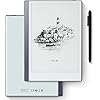
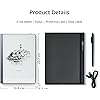
Android E-Ink ePaper Tablet, Paperwhite eBook Reader Digital Notebook for Note Taking, Drawing Paper White Graphics Notepad with Stylus and Case, Cloud Sync and Screen Casting - Model Mini 9.7" Silver


  • Based on 92 reviews
Condition: New
Checking for the best price...
$259.99 Why this price?
Save $29.99 was $289.98

Buy Now, Pay Later


As low as $43.33 / mo
  • – 6-month term
  • – No impact on credit to apply
  • – Instant approval decision
  • – Secure and straightforward checkout

Ready to go? Add this product to your cart and select a plan during checkout.

Payment plans are offered through our trusted finance partners Klarna, Affirm, Afterpay, Apple Pay, and PayTomorrow. No-credit-needed leasing options through Acima may also be available at checkout.

Learn more about financing & leasing here.

Free shipping on this product

FREE 30-day refund/replacement

To qualify for a full refund, items must be returned in their original, unused condition. If an item is returned in a used, damaged, or materially different state, you may be granted a partial refund.

To initiate a return, please visit our Returns Center.

View our full returns policy here.


Availability: In Stock.
Fulfilled by Amazon

Arrives Friday, Mar 27
Order within 5 hours and 9 minutes
Available payment plans shown during checkout

Protection Plan Protect Your Purchase
Checking for protection plans...

Features

  • 1. KloudNote Mini has a beautiful and stylish design, built-in A35 quad-core processor, 1.5GHz, 32G memory. The display is a 9.7-inch E-ink eye protection screen with a resolution of 1200x825 (150dpi). The operating system is Android 8.1, and it comes with a 4100mAh lithium-ion battery with an effective battery life of up to 40 hours.
  • 2. Features: Electronic paper display technology is different from traditional LED display light-emitting technology. It has no backlight and no strobe, which will not make people feel glare. It is still clearly visible under direct sunlight outdoors. The book-like reading experience can improve the dry eyes, sore eyes, and eye fatigue caused by watching electronic products for a long time, and effectively protect your vision health.
  • 3. Smooth writing experience, you can choose different pen types for writing or drawing, and preset 39 note templates, which can effectively help office workers solve meeting records and other needs, and support multiple cloud storage synchronization functions to ensure that data will never be lost; the note sharing function allows others to easily view their notes.
  • 4. It has built-in handwritten notes to text function and recording function, and can convert the recording files into text output after voice recognition, effectively improving office efficiency.
  • 5. It uses a 4096-level electromagnetic pressure-sensitive pen, which is passive and wireless, with high touch accuracy and no need to be charged. The stylus has a built-in eraser, which can be easily erased by turning it upside down like a traditional pencil.
  • 6. It has an independent R&D team, optimizes and upgrades the system from time to time, and can achieve online upgrades when it is turned on and connected to the Internet, bringing customers a new experience.

Brand: Geniatech


Connectivity Technology: Bluetooth, Wi-Fi


Pressure Sensitivity: 4096 Levels


Operating System: Android


Special Feature: Cloud Data Synchronization, Eye Protection


Product Dimensions: 9.84 x 6.89 x 0.04 inches


Item Weight: 14.8 ounces


Item model number: Kloudnote Mini


Batteries: 1 Lithium Ion batteries required. (included)


Date First Available: April 6, 2021


Manufacturer: Geniatech


Frequently asked questions

If you place your order now, the estimated arrival date for this product is: Friday, Mar 27

Yes, absolutely! You may return this product for a full refund within 30 days of receiving it.

To initiate a return, please visit our Returns Center.

View our full returns policy here.

  • Klarna Financing
  • Affirm Pay in 4
  • Affirm Financing
  • Afterpay Financing
  • PayTomorrow Financing
  • Financing through Apple Pay
Leasing options through Acima may also be available during checkout.

Learn more about financing & leasing here.

Top Amazon Reviews


  • Your Personal Sketchpad – Anytime, Anywhere!
I recently got my hands on the KloudNote Mini, and I'm honestly impressed! This little device packs a punch with its quad-core processor and 32GB of memory. The 9.7-inch E-ink display is a real eye-saver - I can use it for hours without the usual eye strain I get from regular screens. What really stands out is the writing experience. The electromagnetic pen feels natural, and with 4096 pressure levels, it's almost like writing on paper. I love the built-in eraser feature - it's so intuitive! The variety of note templates is great for organizing my thoughts, whether I'm in a meeting or just jotting down ideas. The handwriting-to-text conversion is a game-changer for me. It's made my note-taking so much more efficient, especially when combined with the voice recording feature. Being able to sync everything to the cloud gives me peace of mind too. Battery life is impressive - I can go days without charging, which is perfect for my busy schedule. And it's great to know that the team behind it is constantly working on improvements. If you're looking for a device that combines the best of traditional note-taking with modern technology, the KloudNote Mini is definitely worth checking out. It's become an essential part of my daily routine! ... show more
Reviewed in the United States on October 17, 2024 by Twfolio

  • I like this
I'm liking this thing so far. I'm only giving 5 stars for the following reasons: 1) don't know how long it will last (durability) - it seems well-made, though. 2) cloud connections - it supports Baidu, Dropbox, and onedrive - doesn't appear to support Google drive
Reviewed in the United States on June 2, 2025 by Thomas G. Burke II

  • Great eReader and Note-taking/Drawing Tablet
Summary: The Kloud Mini eInk tablet is a solid device for reading books and taking/sharing notes on the go. You can load the Android Kindle eReader app from the included app store, and the built in Notes app has a slew innovative features built in for sharing your notes to others nearby or online using standard file sharing services. The UI experience is a little rough around the edges, but if you stick to the main uses of an eInk tablet, it's a good experience. Oh, and make sure you perform the update that is offered during the initial setup for the best experience. Details: The built in Notes app uses the included stylus to allow you to not only take notes, but also draw pictures with a pressure sensitive tip. If you make a mistake, just flip over the stylus to use the other end as an eraser just as you would a normal pencil. The feel is excellent and it is very speedy to update for eInk. You can also convert your notes using optical character recognition although you will need to create an account on the Kloudnote server to do that. Now the real jewels here are the multiple of features to allow you to share your notes and drawings. If you're having a family game night playing a game that requires sharing a drawing, you can cast your screen to nearby displays that support casting for all to see rather than breaking out a big pad of paper. I was easily able to cast this to my Roku on my living room TV. It would also work well for ideation sessions in the conference room at the office. Once you have some notes or drawings you want to share with your team or family, you can also share files in a multitude of ways: -Generate a QR code to be scanned by nearby phones -Send by email -OneDrive or Dropbox file sharing (need to log into your account for these) Overall, the Notes app works well and offers a lot of ways to move or share your content. As far as an eReader, my only minor nit is that you have to download the Kindle app yourself and this was a little slower than I expected. Nevertheless, if you've used the Kindle app from the Android store, it's the same experience. The display works great in full sunlight and much easier on your eyes than a backlit LCD screen. One other item I need to point out is that unlike other Android tablets where you swipe up to bring up the navigation keys, this has a small button centered on the right edge of the screen (you can slide it up or down) for navigation. You tap it twice to get to the controls, but from there you have your "back", "home", "power", and a couple of other controls. It takes a little getting used to, but it does work well. Last Word: It bears repeating that this is an eInk tablet and if you stick to using it for things that eInk accels at, you'll have an enjoyable experience. But if you insist on trying to shove a round peg through a square hole, then not so much, but that isn't the device's fault. ... show more
Reviewed in the United States on September 27, 2024 by Tech Nerd Tech Nerd

  • Doesn't support sdcard
It has a microsd card, but the software does not support it. The default memory is too small. The should think about enabling the sdcard.
Reviewed in the United States on December 31, 2025 by desi chandu

  • Was great till it wasn't.
Updating my review in hopes the company will make it right...Got this for my husband and he loves it. It's great for his consulting business. But, it randomly deletes notes. He's lost hours of work multiple times since it forced an update. Have had nothing but issues with it since. We've reached out to the company but no response. ... show more
Reviewed in the United States on December 25, 2024 by Meg H.

  • simple and worth it
Amazing! I wanted sometbing that let me save and do work digitally without the extra-ness of an ipad. This one is beautiful! Functions well, easy navigation. Performs well too. Compared to a kindle scribe its worth the price. Writing is simple and easy. Comes with a case so it shouldnt break or anything. Very simple and perfect honestly ... show more
Reviewed in the United States on April 8, 2025 by vishelle m vishelle m

  • I REALLY Want To Love This Thing!
Deciding to upgrade from a paper notebook, I was immediately drawn to the new e-ink tablet craze. I know the ReMarkable is the Cadillac for such things, but a budget and my negative scale desire to need a subscription to use my device properly had me looking elsewhere. Enter the Kloudnote. The idea of it is amazing! Just handwrite your notes and transfer them to your PC...and it would be great if that's how it worked. In fact, I've never successfully been able to do so. In reaching out to customer service, there isn't much help to be had so far, but we're 'in the process,' so I'll withhold final judgment for the moment. But also? Suddenly today - for no reason at all - it's crashing like crazy. The date also won't stay. I don't know if it's a glitch or what, but the customer service suggestion to log into their site (Kloudnote.com) has also been a fail - the site times out! So I'm giving two stars...because it DOES take notes as promised, but the experience has been much less than stellar. I will update this review once I'm done slugging through with customer service....but honestly, I'm not super hopeful. It shouldn't be this hard to get a simple machine to do what it's promised. ... show more
Reviewed in the United States on December 17, 2024 by C. Rutt

  • Worth it.
Great quality product!
Reviewed in the United States on November 30, 2025 by Zeusfood

Can't find a product?

Find it on Amazon first, then paste the link below.
Checking for best price...